Banglarbhumi Portal 2026: Complete Guide for Kolkata Flat Buyers to Verify Property Before Purchase


Introduction
Buying a flat in Kolkata involves more paperwork than most buyers expect. Between the sale agreement, the registration deed, the mutation application, and WBHIRA compliance, there are multiple documents where discrepancies can cost you dearly - sometimes years after you've moved in.
The Banglarbhumi portal is the one tool that every Kolkata flat buyer must use before signing anything. It gives you real-time access to West Bengal's official land records, ownership history, khatian data, and mutation status - all from a browser or mobile app, in minutes, at no cost for basic services.
This guide explains exactly how to use the Banglarbhumi portal as a flat buyer: what to verify, in what sequence, what to do if something doesn't match, and how to cross-reference it with WBHIRA before you hand over your booking amount.
What Is the Banglarbhumi Portal?
Banglarbhumi (banglarbhumi.gov.in) is the official online land records management platform of the Government of West Bengal, operated by the Department of Land and Land Reforms and Refugee Relief and Rehabilitation.
The portal allows citizens to:
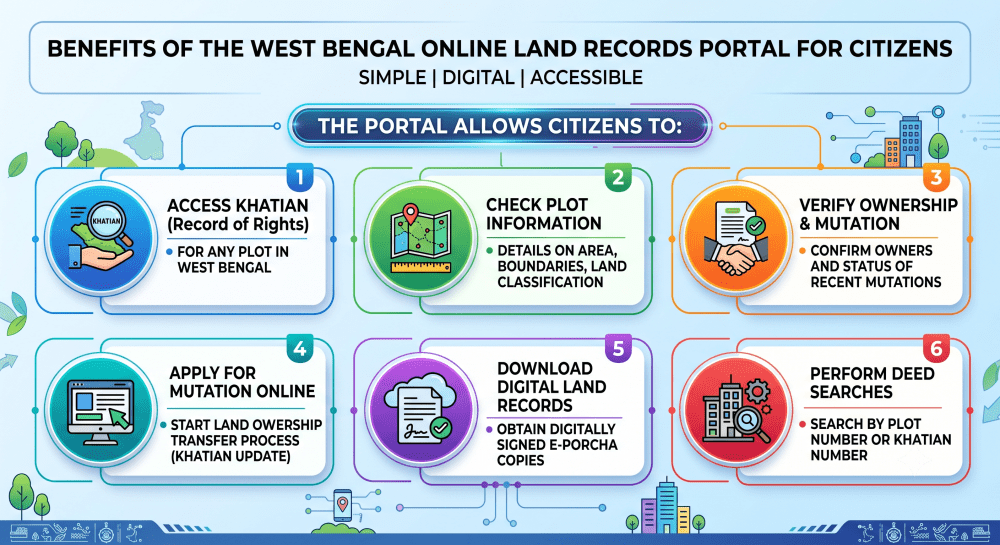
For flat buyers specifically, the portal serves as the first and most important due diligence tool - before you trust the developer's title documents, before you sign the allotment letter, before you apply for a home loan.
Why Kolkata Flat Buyers Must Use Banglarbhumi Before Signing Anything
Most disputes in West Bengal property transactions trace back to one of three issues: title not being clear, mutation not having been done after a prior sale, or the khatian not matching the boundaries claimed in the sale deed.
All three of these can be identified in advance on Banglarbhumi - often in under 10 minutes. Here's what you stand to catch:
- Title disputes: If the plot on which your flat is being built has an unresolved ownership dispute, it will show up in the khatian records as joint ownership or as an entry that doesn't match the developer's claim of clear title.
- Previous sale not mutated: In West Bengal, mutation - updating the land records to reflect a new owner after a sale - is legally required but often delayed or skipped. A flat developer who bought land 5 years ago may not have completed mutation. If the khatian still shows the previous owner's name, you are buying into a gap in the title chain.
- Land classification mismatch: Agricultural land converted for residential development in West Bengal must go through a conversion process. If the land is still classified as agricultural (mouza records will show this), the developer does not yet have legal authority to build residential units on it.
- None of these issues are visible in the developer's brochure. All of them are visible on Banglarbhumi.
How to Access the Banglarbhumi Portal
Visit the official website at banglarbhumi.gov.in. The site's homepage organises services into several primary tabs:
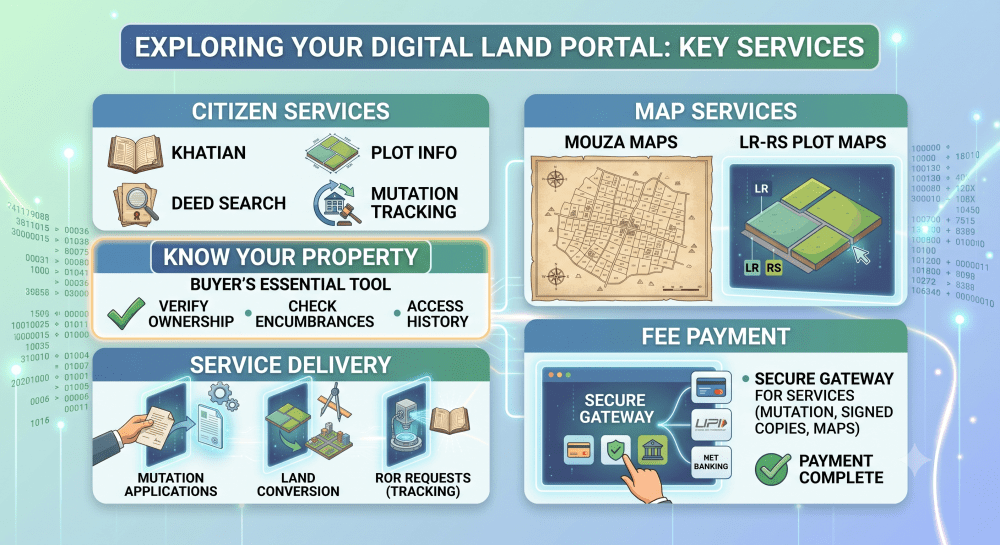
Basic services - including the Know Your Property lookup and khatian checks - are accessible without registration. Advanced features (applying for mutation, downloading digitally signed e-Porcha) require you to create a free account.
The portal supports both English and Bengali, and the interface is accessible via desktop or the Banglarbhumi mobile app on Android.
How to Register on the Banglarbhumi Portal
For flat buyers who need to apply for mutation post-purchase or download a signed e-Porcha for home loan documentation, registration is required. Here's how:
- Go to banglarbhumi.gov.in
- Click "Sign Up" in the top-right corner
- Fill in your full name, address, mobile number, and email ID
- Set a username and password
- Complete the CAPTCHA and submit
- Verify your mobile number via OTP
Once registered, you can log in to access mutation services, track application status, and download digitally certified records.
Step 1 for Flat Buyers: Use the 'Know Your Property' Feature
This is the most important tool on the portal for anyone buying a flat in Kolkata. The **Know Your Property** feature lets you look up any plot in West Bengal using its district, block, mouza, and khatian or plot number.
What you need before starting:
- The developer's registered address of the plot (from their WBHIRA registration or sale agreement draft)
- The khatian number or plot number as listed in the sale deed
How to use it:
- Go to banglarbhumi.gov.in
- Click "Know Your Property" from the main navigation
- Select your District (e.g., Kolkata, North 24 Parganas, South 24 Parganas, Howrah)
- Select the Block
- Select the Mouza (the revenue village sub-division)
- Enter the Khatian Number or Plot Number
- Click "View"
What the result shows:
- Owner's name (current record holder)
- Plot area (in decimal or hectare)
- Land classification (residential, agricultural, commercial)
- Revenue details
What to look for as a buyer:
- The owner's name should match the developer's entity name exactly. If it shows a different individual or company, mutation has not been completed.
- The land classification should be residential or converted for residential use. If it shows agricultural (Vested Agricultural Land or otherwise), the project may not yet have the legal clearances to sell flats.
- The plot area should match (approximately) what the developer has declared in the WBHIRA registration documents.
How to Check Online Khatian in West Bengal
The khatian - officially the Record of Rights (RoR) - is the master ownership document for land in West Bengal. It records who owns a plot, what the plot boundaries are, what type of land it is, and whether any encumbrances exist.
To check online khatian West Bengal:
- Go to banglarbhumi.gov.in > Citizen Services > **Khatian and Plot Information**
- Select District, Block, Mouza
- Select "Khatian" as search type
- Enter the khatian number
- Click 'View'
The result displays:
- Khatian number
- Owner name(s)
- Plot numbers under this khatian
- Area in each plot
- Land use classification (Danga, Bastu, Khamar, etc.)
For flat buyers: what the khatian classification means
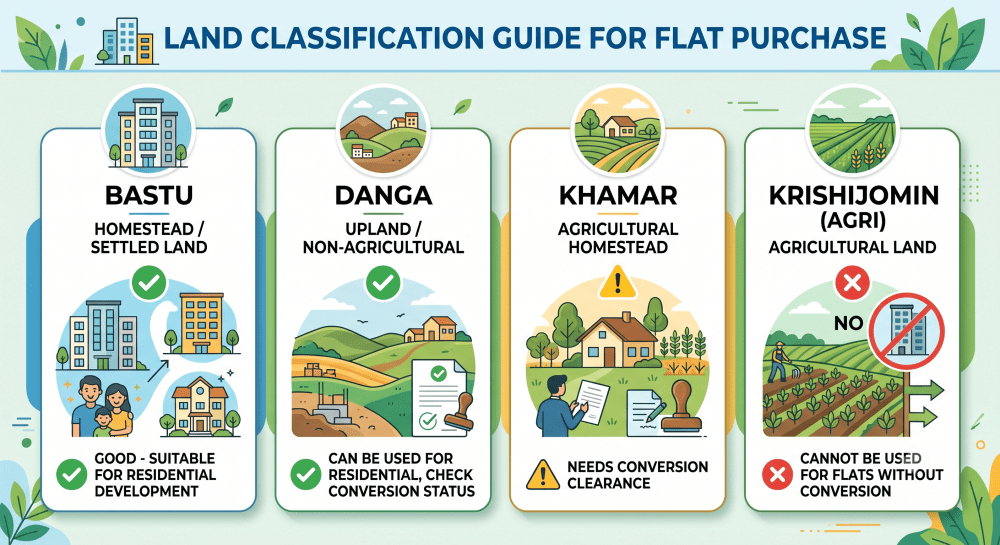
If your flat is on a plot classified as agricultural land, do not book until you see the land conversion certificate issued by the District Land Reform Officer (DLRO).
How to Perform a West Bengal Land Record Search by Name
The Banglarbhumi portal currently does not support direct owner-name search - you need the khatian number or plot number to retrieve records. However, there are two workarounds flat buyers commonly use:
Option 1 - Get the khatian from the sale agreement draft: Any credible developer will include the khatian number in the draft sale agreement or the WBHIRA project registration. Ask for it before signing anything.
Option 2 - Deed search by plot number: If you have the plot number (also available from the developer's WBHIRA registration), use the Deed Search feature under Citizen Services. This shows all registered transactions on that plot - giving you a full chain-of-title picture, including every owner going back as far as the record.
To run a deed search:
- Go to Citizen Services > Deed Information
- Select search by Plot Number and Location
- Enter the mouza, district, and plot number
- View results - you'll see registration numbers, transaction dates, and the names of all parties
What Is Mutation and Why Does It Matter for Flat Buyers?
Mutation is the process by which ownership of land is updated in the government's land records after a sale or transfer. It is a legal requirement in West Bengal, but it is not automatic - the new owner must apply for it, and it typically takes 30–90 days to process.
Why mutation matters for flat buyers:
When you purchase a flat in an under-construction building, you are buying a unit that sits on land the developer owns. That land should show the developer's name (or the development company's name) on the khatian. If it doesn't - if mutation from the previous landowner to the developer was never completed - there is a gap in the title chain that can complicate your own registration later.
After you register your flat deed with the Registration Office, you must also apply for mutation in your name. This changes the government's records to reflect you as the new owner of the plot (or proportionate share of the land under the building).
Mutation checklist for flat buyers:
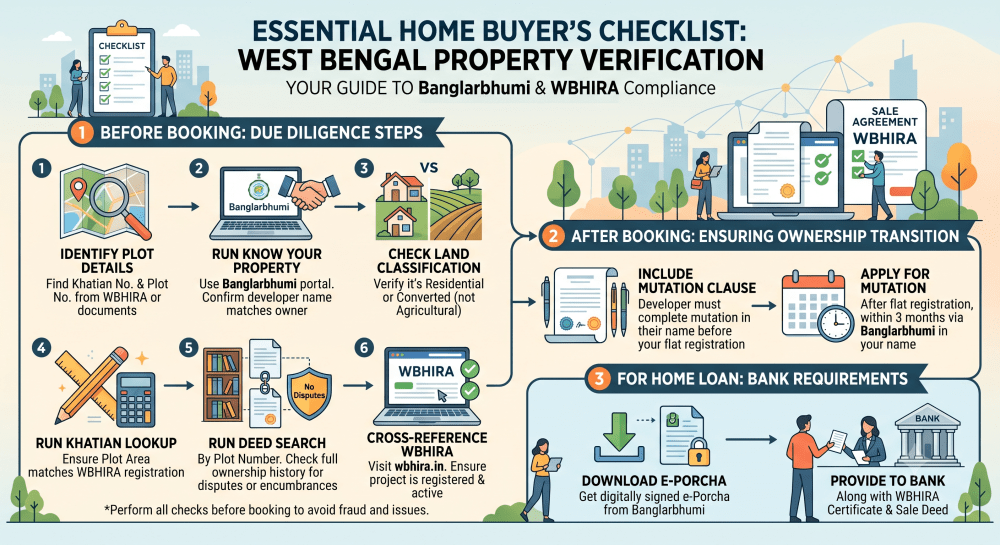
- Before booking: verify the developer's name appears on the khatian (mutation completed from prior owner to developer)
- After registration: apply for mutation within 3 months of registering your sale deed
- Status tracking: use banglarbhumi.gov.in > Citizen Services > Mutation Status** to track your application
How to apply for mutation on Banglarbhumi:
1. Log in to your Banglarbhumi account
2. Go to "Apply for Mutation"
3. Fill in the property details and upload:
- Registered sale deed
- Aadhaar card (buyer)
- Municipal tax receipt (if available)
4. Pay the mutation fee online
5. Submit and note your application reference number
6. Track under "Mutation Status" - expect 30–90 days for approval
How to Cross-Check Banglarbhumi with WBHIRA Before Buying a Flat
In West Bengal, the West Bengal Housing Industry Regulatory Authority (WBHIRA) is the state's equivalent of MahaRERA - every housing project must be registered with WBHIRA before flats can be sold.
Here's how to use both portals together as a buyer:
Step 1 - Find the project on WBHIRA (wbhira.in): Search by project name or developer. Verify that the project is registered (not lapsed), that the registered land parcel matches what the developer is claiming, and that the project's completion date is clearly stated.
Step 2 - Note the khatian number from WBHIRA: WBHIRA registration documents include the land particulars - district, block, mouza, khatian number, plot number, and area. Note these down.
Step 3 - Cross-check on Banglarbhumi: Enter the khatian and plot details from the WBHIRA registration into Banglarbhumi's Know Your Property or Khatian lookup. Verify:
- Owner name in khatian = Developer entity name in WBHIRA registration ✅
- Land area in khatian = Land area in WBHIRA registration (within tolerance) ✅
- Land classification = Residential or converted ✅
If any of these three checks fail, ask the developer for an explanation in writing before proceeding. A responsible developer will provide it immediately. A developer who becomes evasive about a title discrepancy is a developer to walk away from.
How to Download e-Porcha (Digitally Signed Khatian) for Home Loan
If you are applying for a home loan to purchase a flat in Kolkata, most banks will ask for certified land records as part of their due diligence. Banglarbhumi allows you to download a digitally signed e-Porcha (certified copy of the khatian) that is legally valid for banking and court purposes.
How to download e-Porcha:
- Log in to banglarbhumi.gov.in
- Go to Citizen Services > ROR Request
- Select the district, block, mouza, and khatian number
- Pay the applicable fee (nominal, typically ₹25–₹75)
- The digitally signed e-Porcha is generated and available for download
Banks including SBI, HDFC, ICICI, and others accept e-Porcha downloads from the official Banglarbhumi portal as valid title verification documents.
Can Developers and Real Estate Investors Benefit from Banglarbhumi?
Absolutely. For anyone transacting in West Bengal real estate - whether buying a flat, investing in a residential project, or conducting due diligence before a land acquisition - Banglarbhumi is a non-negotiable first step.
Developers use it to:
- Verify clear title before acquiring land for a project
- Check for encumbrances, disputes, or multiple claimants
- Access mouza maps and LR-RS plots to plan site boundaries
Flat buyers use it to:
- Verify the developer's title is clean
- Confirm mutation status of the project land
- Ensure land classification permits residential development
- Download certified records for home loan applications
- Apply for mutation in their name after flat registration
Real estate investors use it to:
- Track ownership history and assess clean-title risk
- Verify resale flats have completed all prior mutations in the chain
- Check if any court orders or government acquisition proceedings affect the land
Is There Any Cost Involved in Using Banglarbhumi?
Most core services on the portal are 'free':
- Know Your Property lookups - free
- Khatian and plot information - free
- Deed search - free
- Mutation application status tracking - free
Paid services:
- Digitally signed e-Porcha (certified RoR copy): ₹25–₹75 per khatian
- Mutation application fee: Varies by land area and district; typically ₹100–₹500
- Land conversion applications: Fees apply under the district administration schedule
All payments can be made directly through the portal using debit/credit cards, UPI, or netbanking.
Is the Banglarbhumi Portal Available on Mobile?
Yes. The Banglarbhumi app is available on Google Play Store (Android). It replicates all core features of the website - Know Your Property, khatian lookup, mutation status tracking, and fee payment.
The app is particularly useful for real estate agents, developers, and buyers who need to verify property details on-site before finalising a purchase decision.
Note: As of 2026, an iOS version of the Banglarbhumi app is not yet available. iPhone users should use banglarbhumi.gov.in on a mobile browser, which is fully responsive.
Banglarbhumi for Flat Buyers: Complete Pre-Purchase Checklist
Use this checklist before handing over any money:
Conclusion
The Banglarbhumi portal is not an optional step in the Kolkata flat-buying process - it is the foundation of sound due diligence. Every reputable developer in West Bengal will have their project land clearly titled, mutated, and classifiable on Banglarbhumi. If they can't provide the khatian details, or if the details don't match what you find on the portal, that is the signal you needed before you spent your money.
The combination of Banglarbhumi + WBHIRA verification takes about 30 minutes and requires no legal expertise. It can save you from the most expensive mistakes a flat buyer can make in West Bengal.
At Blox, every residential project we list in Kolkata is verified for WBHIRA compliance. But we always encourage buyers to independently run their Banglarbhumi checks too - because informed buyers make better decisions, and better decisions make better markets.
Explore WBHIRA-registered flats in Kolkata on Blox - zero brokerage, direct from builder.
Verify all property details independently at banglarbhumi.gov.in and wbhira.in before booking. Blox lists only WBHIRA-registered residential projects in Kolkata - zero brokerage, direct from builder.
Frequently Asked Questions
What is the Banglarbhumi portal?

How do I check know your property West Bengal?
What is a khatian number?
How to do online khatian check West Bengal?
What is mutation and why is it important for flat buyers?
What is the banglar bhumi portal used for?
How to verify a flat developer's title using Banglarbhumi?
What does the khatian classification "Bastu" mean?
What is WBHIRA and how is it different from Banglarbhumi?
Is the Banglarbhumi portal free to use?
Can I apply for mutation online on Banglarbhumi?
What is an e-Porcha?
Does Banglarbhumi support name-based land record search?
What land classification indicates agricultural land in West Bengal?
How long does mutation take after flat registration in West Bengal?

Get in Touch
Let our experts help you answer your questions

 +91
+91


Get in Touch
Let our experts help you answer your questions
+91